Custom Styling & CSS Variables
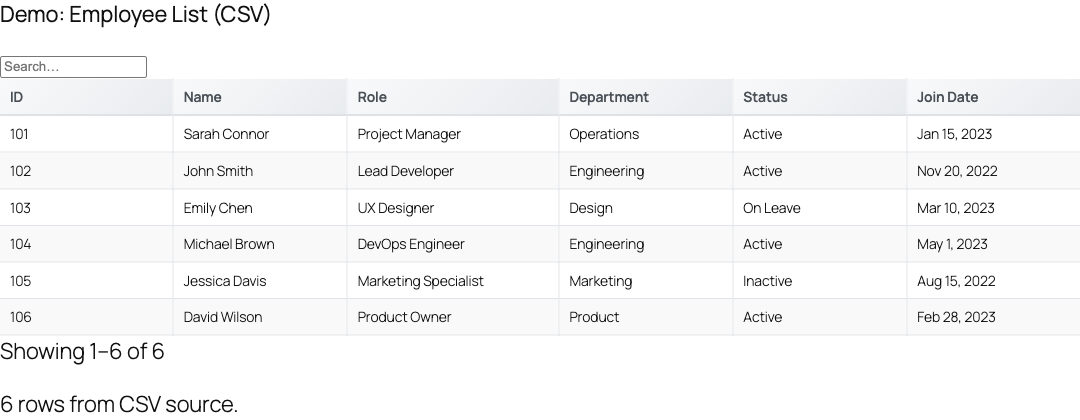
TableCrafter renders plain, semantic HTML tables wrapped in predictable .tc- CSS classes, so you can theme every part of the table from your own stylesheet without touching the plugin. This page covers the class structure, column targeting, the CSS variables used for high-contrast mode, and the automatic dark-mode and reduced-motion behavior.
How styling works
TableCrafter does not store presets or a theme picker. Instead, it ships one stylesheet, assets/css/tablecrafter.css (registered with the handle tablecrafter-style and enqueued automatically whenever a table renders). Every rendered table uses a stable set of class names, all prefixed with tc-. To restyle a table, add your own CSS that targets those classes; because your theme stylesheet typically loads after the plugin stylesheet, your rules win on specificity ties.
There is no class or theme attribute on the [tablecrafter] shortcode. Styling is done entirely through CSS targeting the .tc- classes described below.
The markup structure
A rendered table is nested inside an outer container element. Knowing this hierarchy lets you scope CSS precisely so you only affect TableCrafter tables and not every <table> on the page.
<!-- Outer wrapper emitted by the shortcode -->
<div class="tablecrafter-container" id="tc-..." data-source="...">
  <div class="tc-wrapper">
    <div class="tc-table-container">
      <table class="tc-table">
        <thead>
          <th class="tc-sortable" data-field="price" aria-sort="none">Price</th>
        </thead>
        <tbody>
          <td data-tc-label="Price">$19.00</td>
        </tbody>
      </table>
    </div>
  </div>
</div>| Selector | What it targets |
|---|---|
| .tablecrafter-container | Outermost element; carries the table id and all data-* config attributes. |
| .tc-wrapper | Inner wrapper that sets the base font, size, line height, and text color. |
| .tc-table-container | Scroll container with the border, radius, and background. |
| .tc-table | The <table> itself. |
| .tc-table th | Header cells (sticky header, shaded background). |
| .tc-table td | Body cells. |
| .tc-sortable | Sortable header cells; also carries the sort arrow pseudo-elements. |
A practical theming example
Because every class is documented and stable, a few rules are usually enough to match your brand. Add this to your theme's stylesheet (or a custom-CSS panel):
/* Brand the header row */
.tc-table th {
  background-color: #0f172a;
  color: #ffffff;
}

/* Tighten the container and soften the border */
.tc-table-container {
  border: 1px solid #e2e8f0;
  border-radius: 12px;
}

/* Custom row-hover color */
.tc-table tr:hover {
  background-color: #f1f5f9;
}Scope your rules under .tc-wrapper (for example .tc-wrapper .tc-table th) when you have multiple table plugins on a page, so your overrides only touch TableCrafter tables.
Targeting specific tables
Each rendered table gets a unique id on its .tablecrafter-container. By default this is an auto-generated value like tc-64f1a2…, but you can set your own with the shortcode id attribute so you have a clean handle for CSS.
[tablecrafter source="https://api.example.com/data.json" id="pricing-table"]/* Styles applied to only this one table */
#pricing-table .tc-table th {
text-transform: uppercase;
letter-spacing: 0.5px;
}| Attribute | Required | Purpose in styling |
|---|---|---|
| id | Optional | Sets the container id so you can target a single table from CSS. Defaults to a generated tc-* value. |
| include | Optional | Limits which columns render, which also limits which header/cell selectors exist on the page. |
| exclude | Optional | Hides specific columns from the output entirely. |
Targeting individual columns
TableCrafter does not add a separate class per column, but it does expose the source key on each sortable header through the data-field attribute. Pair this with the :nth-child() selector to style a single column from header through body.
/* Style the header for the "status" column by its data key */
.tc-table th[data-field="status"] {
  color: #dc2626;
}

/* Right-align the 3rd column (header + cells) */
.tc-table th:nth-child(3),
.tc-table td:nth-child(3) {
  text-align: right;
  font-variant-numeric: tabular-nums;
}The data-field value is the raw key from your data source. If you reorder columns with the include attribute, the :nth-child() position changes to match the new order, so prefer data-field when you want a column targeted regardless of position.
Styling the mobile card view
On narrow screens TableCrafter reflows rows into stacked cards. Each card cell carries a data-tc-label attribute holding the column name, and the card pieces use their own classes so you can theme the mobile layout independently from the desktop table.
| Selector | What it targets |
|---|---|
| .tc-cards-container | Grid that holds all cards on mobile. |
| .tc-card | An individual record rendered as a card. |
| .tc-card-header | The card's title row. |
| .tc-card-label | The field name (uppercased label) inside a card. |
| .tc-card-value | The field value inside a card. |
| td[data-tc-label] | Body cells, labeled with their column name for responsive/card rendering. |
CSS variables & high-contrast mode
TableCrafter exposes a small set of CSS custom properties. They are defined on the wrapper when the tc-high-contrast class is active and drive the high-contrast color treatment for borders, text, background, and focus rings.
| Variable | Controls | Default (high-contrast) |
|---|---|---|
| --tc-border-color | Table and cell borders in high-contrast mode. | #000000 |
| --tc-text-color | Cell text color in high-contrast mode. | #000000 |
| --tc-bg-color | Cell background in high-contrast mode. | #ffffff |
| --tc-focus-color | Focus outline color in high-contrast mode. | #ff0000 |
You can override these to align high-contrast styling with your palette:
.tc-wrapper.tc-high-contrast {
  --tc-border-color: #1a1a1a;
  --tc-focus-color: #ffbf00;
}The tc-high-contrast class is added automatically by TableCrafter's JavaScript when the operating system reports prefers-contrast: high, and it is toggled live if the user changes that preference. You don't apply it manually; you just style for it.
Dark mode & reduced motion
TableCrafter does not ship a full dark theme for the table body, but it does adapt two visual systems automatically based on the visitor's OS preferences:
- Dark mode skeletons, Under
@media (prefers-color-scheme: dark), the loading skeleton (.tc-skeleton,.tc-skeleton-row,.tc-skeleton-cell) switches to darker gradient tones so the shimmer placeholder looks correct on dark backgrounds. - Reduced motion, When the OS reports
prefers-reduced-motion: reduce, the script adds atc-reduced-motionclass that drops animations and transitions to near-zero duration (including the spinner and shimmer effects).
If you want the full table to follow a dark theme, add your own dark rules using the same media query and the documented classes:
@media (prefers-color-scheme: dark) {
  .tc-table-container { background: #111827; border-color: #374151; }
  .tc-table th { background-color: #1f2937; color: #e5e7eb; }
  .tc-table td { color: #d1d5db; border-bottom-color: #374151; }
  .tc-table tr:hover { background-color: #1f2937; }
}Many of the plugin's accessibility rules (focus outlines, contrast fixes) use !important to guarantee WCAG behavior. If one of your overrides is being ignored, check whether an !important rule in the plugin stylesheet is winning and raise your selector's specificity accordingly.
Styling state & rich cells
Beyond the base table, TableCrafter applies utility and state classes you can hook into for visual feedback. These are stable class names rendered by the plugin or its frontend script.
| Selector | Applied to |
|---|---|
| .tc-link | Auto-linked URLs and email addresses inside cells. |
| .tc-badge / .tc-badge-success / .tc-badge-error | Boolean and status values rendered as badges. |
| .tc-tag / .tc-tag-list | Array values rendered as a list of tags. |
| .tc-cell-image | Image values rendered inside a cell (with hover zoom). |
| .tc-no-results | The empty-state message shown when a search/filter returns nothing. |
| .tc-error-state | The graceful fallback shown to visitors when a data source fails. |
| .tc-loading | The placeholder shown before the table hydrates. |
Where the stylesheet loads
The plugin registers its stylesheet under the handle tablecrafter-style and enqueues it on any page that renders a table. The file path is assets/css/tablecrafter.css inside the plugin folder, and it is versioned to the plugin version (currently 3.5.6) for cache-busting. If you need to fully replace the styling, you can dequeue this handle from your theme's wp_enqueue_scripts hook and ship your own CSS, but overriding the .tc- classes is the recommended, upgrade-safe approach.
Next, see columns.html for using include and exclude to control which columns render, and shortcode.html for the full [tablecrafter] attribute reference.