Data Source Troubleshooting
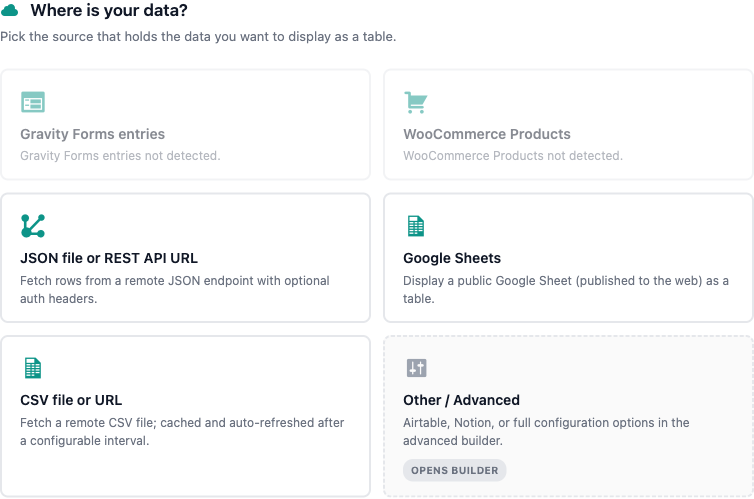
When a TableCrafter table shows an error banner, a "Retry" button, or no rows, the cause is almost always in the data source layer. This page maps every real error TableCrafter raises to its root cause and fix, covering unreachable or blocked URLs, CORS, authentication failures, and empty or malformed data.
How TableCrafter loads a source
Every table is rendered by the [tablecrafter] shortcode. The source attribute is the data URL, and the fetch pipeline runs in this order: local file resolution, then a security (SSRF) check, then the protocol-specific fetcher (Airtable, CSV/Google Sheets, or remote JSON). Understanding this order tells you where a failure happened.
// Minimal example - a remote JSON source
[tablecrafter source="https://api.example.com/products.json" root="data" search="true"]
There are two distinct render paths, and the error you see depends on which one ran:
- Server-side (PHP) first render, TableCrafter fetches the data on the server through
TC_Data_Fetcherand caches the HTML. Failures here surface as a styled error block on the page. - Client-side hydration / refresh, the browser refetches via JavaScript (
assets/js/tablecrafter.js). Failures here render a.tc-error-containerwith a Retry button and log to the browser console.
Logged-in administrators see a detailed TableCrafter Setup Guide panel (.tc-admin-error-helper) with the raw error message. Visitors see only a generic .tc-error-state notice: "Unable to load data. Please check back later." Always reproduce issues while logged in as an admin so you can read the real error.
Reading the error message
TableCrafter returns a WP_Error with a specific code and message for each failure class. Match the message you see (in the admin helper, or in the proxy response prefixed with TableCrafter Proxy Error:) to the table below.
| Error message | Error code | Meaning |
|---|---|---|
| The provided URL is blocked for safety (Local/Private IP). | security_error | SSRF guard blocked a localhost/private-range/invalid URL. |
| CURL Error: <detail> | http_error | Source unreachable, DNS failure, TLS handshake failure, or timeout. |
| Source returned HTTP <code> | http_error | Server replied with a non-200 status (404, 403, 500, etc.). |
| The source did not return a valid JSON structure. | json_error | Body was not parseable JSON (often an HTML error page). |
| Path Error: Key '<x>' not found in data structure. | path_error | The root attribute points at a key that does not exist. |
| Empty Source: The data received is empty. | - | Fetch succeeded but produced zero rows. |
Unreachable or blocked sources
An http_error means TableCrafter reached the network layer but could not get a usable response. Work through these causes:
- Source returned HTTP 404 / 403 / 500, open the exact
sourceURL in a browser or withcurl. If it 404s or requires a login, fix the URL or make the endpoint public. TableCrafter requires a200response. - CURL Error / connection timeout, the host is unreachable from your server. Remote JSON has a 10-second connect and 30-second total timeout. Confirm outbound HTTP is allowed (some managed hosts block it) and that the host resolves via DNS.
- TLS / certificate errors, TableCrafter enforces SSL verification (
CURLOPT_SSL_VERIFYPEERandsslverifyare on) using WordPress's bundled CA bundle. A self-signed or expired certificate on the source will fail. Fix the certificate on the source rather than disabling verification.
The client-side loader (TC_HTTP_Request) automatically retries transient failures up to 3 times with exponential backoff. It does not retry 4xx client errors (except 429), security blocks, or JSON parse errors, those are treated as permanent, so fix the source rather than reloading repeatedly.
"Blocked for safety" (SSRF protection)
The security_error comes from TC_Security::is_safe_url(), which runs WordPress core's wp_http_validate_url(). It rejects localhost, 127.0.0.1, [::1], private IP ranges (e.g. 10.x, 192.168.x), and malformed URLs. This is an intentional anti-SSRF measure, not a bug.
- If your data genuinely lives on the same box, expose it through the site's public hostname instead of an internal IP, or reference it as a local file under the WordPress root (local
.json/.csvpaths underABSPATH,wp-content, or the plugin folder bypass the SSRF check entirely). - Behind a reverse proxy or load balancer, the client-IP detection can be tuned with the
tablecrafter_trusted_ip_headersfilter, but this affects rate limiting, not the source URL block.
CORS errors (client-side only)
CORS only affects the direct browser fetch path. If the console shows a CORS or "blocked by CORS policy" error and the table falls back to renderError, the source server is not sending Access-Control-Allow-Origin for your domain.
The correct fix is to route the request through TableCrafter's server-side proxy, which fetches from PHP and is never subject to CORS. The proxy is the AJAX action tc_proxy_fetch; it requires the edit_posts capability and a valid tc_proxy_nonce. Because the server-rendered first paint already uses TC_Data_Fetcher server-side, simply ensuring the table renders on initial page load (rather than relying on a pure client fetch) sidesteps CORS for visitors.
- Symptom: console logs
TableCrafter: Load failedorTableCrafter: Hydration failedwith a network/CORS error, and a.tc-error-messageappears. - Fix: add your site origin to the source's CORS allow-list, or serve the data from a CORS-permissive endpoint (Google Sheets CSV export and Airtable's API both work server-side via the proxy).
You cannot fix a CORS rejection from inside TableCrafter alone, the source server controls CORS headers. The plugin's mitigation is to fetch server-side; if direct client fetch is unavoidable, the upstream host must add the header.
Authentication failures
Auth failures appear most often with Airtable sources, which use the airtable:// protocol and a Personal Access Token (PAT). The token can be passed inline as ?token= or saved once in WordPress Admin → TableCrafter settings (stored encrypted via TC_Security::encrypt_token()).
// Airtable source: base id, table name, and a PAT
[tablecrafter source="airtable://appXXXXXXXX/Tasks?token=patXXXXXXXX&view=Grid"]| HTTP code | Error code | Cause & fix |
|---|---|---|
| - | airtable_no_token | No PAT supplied inline or saved. Add ?token= or save it in settings. |
| 401 | airtable_auth_error | Invalid or revoked PAT. Regenerate the token in Airtable. |
| 403 | airtable_permission_error | Token lacks access to that base/table. Grant the base scope to the PAT. |
| 404 | airtable_not_found | Wrong Base ID or Table Name. Verify both (Base IDs start with app). |
| 429 | airtable_rate_limit | Rate limit hit. Airtable results are cached for 5 minutes; wait and retry. |
| 500/502/503 | airtable_server_error | Airtable outage. Retry later. |
For protected JSON APIs (not Airtable), TableCrafter's remote JSON fetcher does not send custom auth headers, so an endpoint requiring an API key in a header will return http_error with HTTP 401/403. Either make the endpoint public, embed the key in the query string if the API supports it, or front it with a public, read-only proxy.
Empty or malformed data
Here the fetch succeeded (HTTP 200) but the table is blank or wrong. Diagnose by symptom:
| Symptom | Likely cause | Fix |
|---|---|---|
| "Empty Source: The data received is empty." | Source returned [], {}, or all rows were filtered out. | Confirm the source has rows; check include/exclude didn't remove every column. |
| "did not return a valid JSON structure" | Body is HTML (a login wall or error page) or truncated JSON. | Open the URL raw, if you see HTML, the endpoint isn't a JSON feed. |
| "Path Error: Key '…' not found" | root points at a missing key. | Inspect the JSON shape and set root to the real path (dot notation). |
| Table renders but columns are blank | Rows are not a flat list of objects. | Use root to drill into the array of row objects. |
TableCrafter expects the data to be (or resolve to, via root) an array of objects, one object per row, with each key becoming a column. The root attribute uses dot notation to reach a nested array:
// Source returns { "data": { "items": [ {…}, {…} ] } }
[tablecrafter source="https://api.example.com/feed.json" root="data.items"]CSV and Google Sheets: rows whose column count does not match the header row are silently skipped during parsing. If a Sheet shows fewer rows than expected, check for ragged rows, stray commas, or unescaped quotes. A leading byte-order mark (BOM) is stripped automatically from the first header. Google Sheets must be link-shareable (the plugin requests the public CSV export); a private Sheet returns an HTML login page and fails as json_error/empty.
Clearing stale cache after a fix
TableCrafter caches both the fetched data and the rendered HTML (transients prefixed tc_cache_ and tc_html_; Airtable for 5 minutes, others for 1 hour). After you fix a source you may still see the old error or old rows until the cache expires. Force a refresh with WP-CLI:
# Remove all TableCrafter data, HTML, and export transients
wp tablecrafter clear-cache

# Re-fetch every tracked source immediately
wp tablecrafter warm-cache
Proactive health monitoring
For sources that fail intermittently, TableCrafter ships a health monitor (TC_Data_Source_Health_Monitor) that records check results and can alert you before visitors notice. Each check returns a status of healthy, degraded (reachable but missing expected keys), or failed, and history is retained for 7 days.
- degraded means the source responded but is missing keys you registered as
expected_keys, a sign the upstream schema changed. - failed can trigger email and/or webhook alerts once a configurable failure
thresholdis reached, so a broken feed pages you instead of silently breaking the table.
Quick diagnostic checklist
- Reproduce while logged in as an admin to read the real error in the
.tc-admin-error-helperpanel. - Open the exact
sourceURL in a new tab, does it return raw JSON/CSV with HTTP 200? - If "blocked for safety," the URL is a private/local address, use the public hostname or a local file path.
- Open the browser console for client-side failures:
TableCrafter: Load failedplus a CORS or network error points to the upstream host. - For "Path Error" or blank columns, fix the
rootattribute to point at the array of row objects. - Run
wp tablecrafter clear-cacheafter any change, then reload.
Once your source loads cleanly, continue with data-sources.html to learn every supported source type, or refine column selection and labels in columns.html.