Connect a REST API or JSON Endpoint
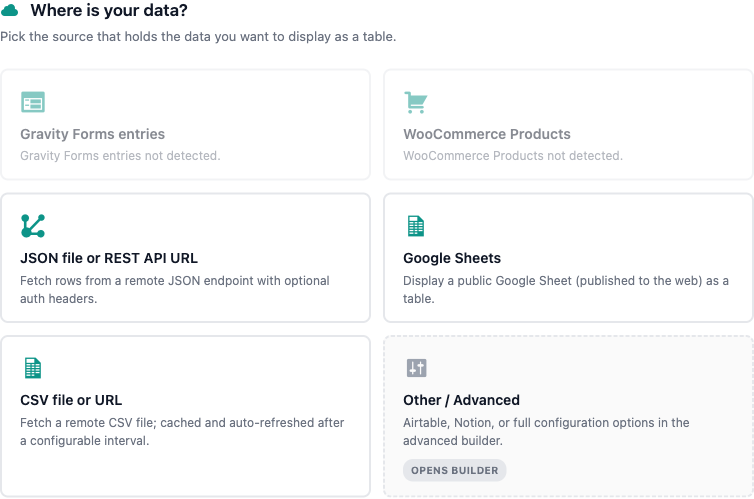
Point TableCrafter at any public JSON API or endpoint and it fetches, caches, and renders the response as an accessible, server-side table, with built-in SSRF protection and dot-notation mapping for nested data.
Overview
Any endpoint that returns a JSON array of objects, or an object that contains such an array, can become a TableCrafter table. There is no database import step: data is fetched directly from the source at render time, normalized into rows and columns, and cached so repeat page loads stay fast. The same source attribute also accepts Google Sheets and CSV URLs, but this page focuses on REST and JSON.
Under the hood, fetching is handled by TC_Data_Fetcher (in includes/class-tc-data-fetcher.php) and the unified TC_HTTP_Request handler (includes/class-tc-http-request.php), with every outbound URL validated by TC_Security (includes/class-tc-security.php) before a single byte leaves your server.
Quick Start
The fastest path is the visual builder under the TableCrafter admin menu: paste your JSON URL, toggle Search / Filter / Export, click Preview Table, then copy the generated shortcode. The minimal shortcode is just a source URL:
[tablecrafter source="https://api.example.com/v1/products"]If the endpoint returns a top-level JSON array of objects, TableCrafter renders it immediately, object keys become column headers and each array element becomes a row.
The endpoint must return application/json. TableCrafter detects JSON by the response Content-Type header or by sniffing whether the body begins with { or [. A response that does not parse as valid JSON returns a clear error instead of a broken table.
Shortcode Attribute Reference
These are the attributes most relevant to REST/JSON sources. All are passed to the [tablecrafter] shortcode.
| Attribute | Required | Description |
|---|---|---|
| source | Required | The full URL to your JSON API or endpoint. Sanitized with esc_url_raw() and validated for SSRF safety before fetching. |
| root | Optional | Dot-notation path to the array inside the response (e.g. data.results). Required whenever your list is nested rather than at the top level. |
| include | Optional | Comma-separated keys to show, in order. Supports aliasing with key:Label to rename a column header. |
| exclude | Optional | Comma-separated keys to hide from the table. |
| search | Optional | Show the live search bar (true / false). Defaults to false. |
| filters | Optional | Show per-column filters (true / false). Defaults to true. |
| per_page | Optional | Rows per page for client-side pagination (e.g. per_page="25"). |
| sort | Optional | Initial sort in column:direction format, e.g. sort="price:desc". |
| export | Optional | Enable CSV / clipboard export tools (true / false). |
Mapping JSON to Rows and Columns
TableCrafter expects the data it renders to be a list of objects: an array where each element is an object with the same keys. Each object becomes one row; the keys of the first row define the column headers.
Top-Level Arrays
If your endpoint returns the array directly, no root is needed:
# Response: [ {"id":1,"name":"Acme"}, {"id":2,"name":"Globex"} ]
[tablecrafter source="https://api.example.com/companies"]
Nested Arrays with root
Most real-world APIs wrap their results. Use root with a dot path to drill down to the array. Given a response like:
{
  "status": "ok",
  "data": {
    "results": [
      { "symbol": "BTC", "price": 64200 },
      { "symbol": "ETH", "price": 3100 }
    ]
  }
}
point root at the nested list:
[tablecrafter source="https://api.example.com/prices" root="data.results"]Each path segment is looked up in turn; if a segment key is missing TableCrafter returns a Path Error naming the key that could not be found, so misconfigured paths are easy to debug.
Choosing and Renaming Columns
Use include to whitelist columns (and set their order), or exclude to drop noisy fields. Append :Label to any included key to give it a friendly header:
[tablecrafter source="https://api.example.com/prices"
  root="data.results"
  include="symbol:Ticker, price:USD Price"
  sort="price:desc"
search="true"]If an endpoint returns a flat array of scalars (e.g. ["red","green","blue"]) rather than objects, TableCrafter auto-wraps each item into a single Value column so it still renders as a usable table.
Request Headers and Authentication
For plain public JSON endpoints, no authentication is needed, TableCrafter performs a standard GET and sends a descriptive User-Agent (TableCrafter/{version} (WordPress Plugin)). SSL certificate verification is always on, using WordPress's bundled CA bundle when present.
For APIs that require a token, TableCrafter ships a dedicated Airtable integration that demonstrates the supported auth model. Airtable sources use a custom URL scheme and send a Bearer token in the Authorization header:
# airtable://{baseId}/{tableName}?token={PAT}&view={viewId}
[tablecrafter source="airtable://appXXXX/Tasks?view=Grid view"]
The Personal Access Token can be passed inline via the token query parameter, or, recommended, saved once in the admin settings, where it is stored encrypted at rest using AES-256-CBC keyed from your WordPress AUTH_KEY salt. The Airtable handler also paginates automatically (100 records per page) and flattens nested fields, attachments, and linked records into displayable cells.
The generic [tablecrafter source="https://…"] JSON fetch does not expose a shortcode attribute for arbitrary request headers or API keys. For endpoints that require custom Authorization headers, either use a token-aware integration like Airtable, or front the API with a server-side route that returns public JSON. Never embed secret keys directly in a shortcode, they would be exposed in the page source.
SSRF Protection
Because TableCrafter fetches URLs on the server's behalf, every remote source is screened to prevent Server-Side Request Forgery. The check in TC_Security::is_safe_url() runs before any HTTP request and uses WordPress core's wp_http_validate_url(), which rejects:
localhost,127.0.0.1, and IPv6 loopback ([::1])- Private IP ranges (10.x, 172.16 - 31.x, 192.168.x) and reserved/link-local ranges
- Non-HTTP(S) and otherwise malformed URLs
A blocked URL returns a security error ("The provided URL is blocked for safety (Local/Private IP).") and never reaches the network layer. This stops a table from being used to probe internal services or cloud metadata endpoints.
URLs pointing back at your own site (matching site_url(), home_url(), or the plugin URL) are resolved as local files through a path whitelist (site root, wp-content, plugin dir) with directory-traversal protection, they bypass the network entirely rather than triggering a loopback request.
The AJAX Proxy
To sidestep browser CORS restrictions, client-side refreshes route through a secure server-side proxy (the tc_proxy_fetch AJAX action). Every proxy request is defended in depth:
- Nonce verified, requires a valid
tc_proxy_nonce. - Capability gated, the caller must have
edit_postsormanage_options. - Rate limited, capped at 30 requests per 60-second window per user/IP, returning HTTP 429 when exceeded.
- SSRF screened, the same
is_safe_url()validation applies to proxied URLs.
Successful responses are cached as transients (one hour by default) so repeated fetches of the same URL are served instantly.
Caching, Retries, and Reliability
First render fetches synchronously and stores both the rendered HTML and the parsed data. Subsequent loads use a Stale-While-Revalidate strategy: cached output is served immediately, and a background refresh is scheduled when the cache is older than five minutes. Remote JSON is cached for one hour; token-rate-limited sources such as Airtable use a tighter five-minute TTL.
The unified TC_HTTP_Request handler adds resilience for transient failures: it retries with exponential backoff (up to 3 attempts for data fetches) but deliberately does not retry on security errors, JSON parse errors, or 4xx client errors, except 429 (rate limit), which is retried. This avoids hammering an endpoint that has already rejected the request.
Tables are rendered server-side as real HTML, so your API data is crawlable and indexable. Enable WP_DEBUG to see fetch, HTTP, and security log entries (with sensitive query parameters stripped from logged URLs) when troubleshooting a connection.
Troubleshooting
| Symptom | Likely cause and fix |
|---|---|
| Blocked for safety | The URL resolves to localhost or a private/reserved IP. Use a publicly reachable hostname. |
| Path Error: key not found | Your root path is wrong. Inspect the raw JSON and correct the dot-notation to reach the array. |
| Not a valid JSON structure | The endpoint returned HTML or malformed JSON. Confirm it returns application/json and a 200 status. |
| Structure / Empty Dataset error | The target value is not a list of objects, or the array is empty at that path. Point root at the correct array. |
| Source returned HTTP 4xx/5xx | Upstream rejected the request (often auth or rate limiting). Check the endpoint and any required token. |
When a source fails, administrators (users with manage_options) see a detailed error helper inline, while regular visitors see a graceful fallback message instead of a broken table.
Next Steps
To pull live data from Airtable with stored credentials, see airtable.html; to connect spreadsheet data instead, see google-sheets.html.